> ## Documentation Index
> Fetch the complete documentation index at: https://docs.totowallet.app/llms.txt
> Use this file to discover all available pages before exploring further.
# 报销功能
在记账页面,图图记账提供了多种实用功能供大家选择,其中就包括了「报销」功能
***
## **创建报销账单**
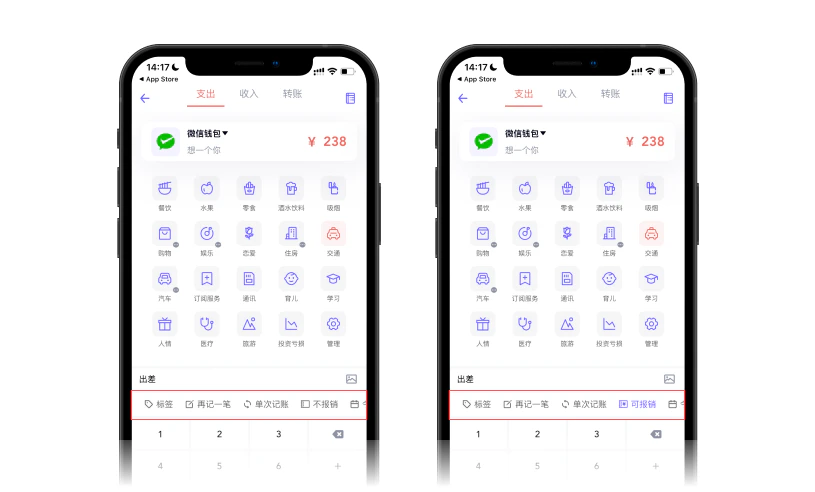
报销账单的记录操作非常简单,打开记账页面,在数字键盘上方的工具栏里点击「不报销」,即可将该笔账单标记为「报销账单」;
> 「不报销」为当前账单状态,单击即可切换为「报销」
 ***
## **怎么报销账单?**
创建完报销账单后,在账单列表中左滑报销账单,在右侧出现的快捷按钮中会看到「报销」功能,也可点击账单进入该笔账单的详情页面,点击下方快捷按钮中的「报销」。
***
## **怎么报销账单?**
创建完报销账单后,在账单列表中左滑报销账单,在右侧出现的快捷按钮中会看到「报销」功能,也可点击账单进入该笔账单的详情页面,点击下方快捷按钮中的「报销」。
 报销功能 通过上述两种方法进入报销页面后,输入报销金额、选择报销款项收入的账款、报销时间,即可完成该笔账单的报销操作。
提示
创建一条报销账单后,该条账单即处于「待报销」状态,报销完成后,账单状态即变为「已报销」。
***
### **报销账单管理**
报销账单也可在图图记账设置-报销账单管理中进行集中处理。
***
## **报销账单的统计**
1. 未报销的报销账单,金额仍会计入到支出统计里;
2. 报销账单完成报销后,会生成一条「报销入账」账单,抵消报销账单的支出,报销入账账单不会纳入收入统计;
***
报销功能 通过上述两种方法进入报销页面后,输入报销金额、选择报销款项收入的账款、报销时间,即可完成该笔账单的报销操作。
提示
创建一条报销账单后,该条账单即处于「待报销」状态,报销完成后,账单状态即变为「已报销」。
***
### **报销账单管理**
报销账单也可在图图记账设置-报销账单管理中进行集中处理。
***
## **报销账单的统计**
1. 未报销的报销账单,金额仍会计入到支出统计里;
2. 报销账单完成报销后,会生成一条「报销入账」账单,抵消报销账单的支出,报销入账账单不会纳入收入统计;
***