> ## Documentation Index
> Fetch the complete documentation index at: https://docs.totowallet.app/llms.txt
> Use this file to discover all available pages before exploring further.
# 取消订阅
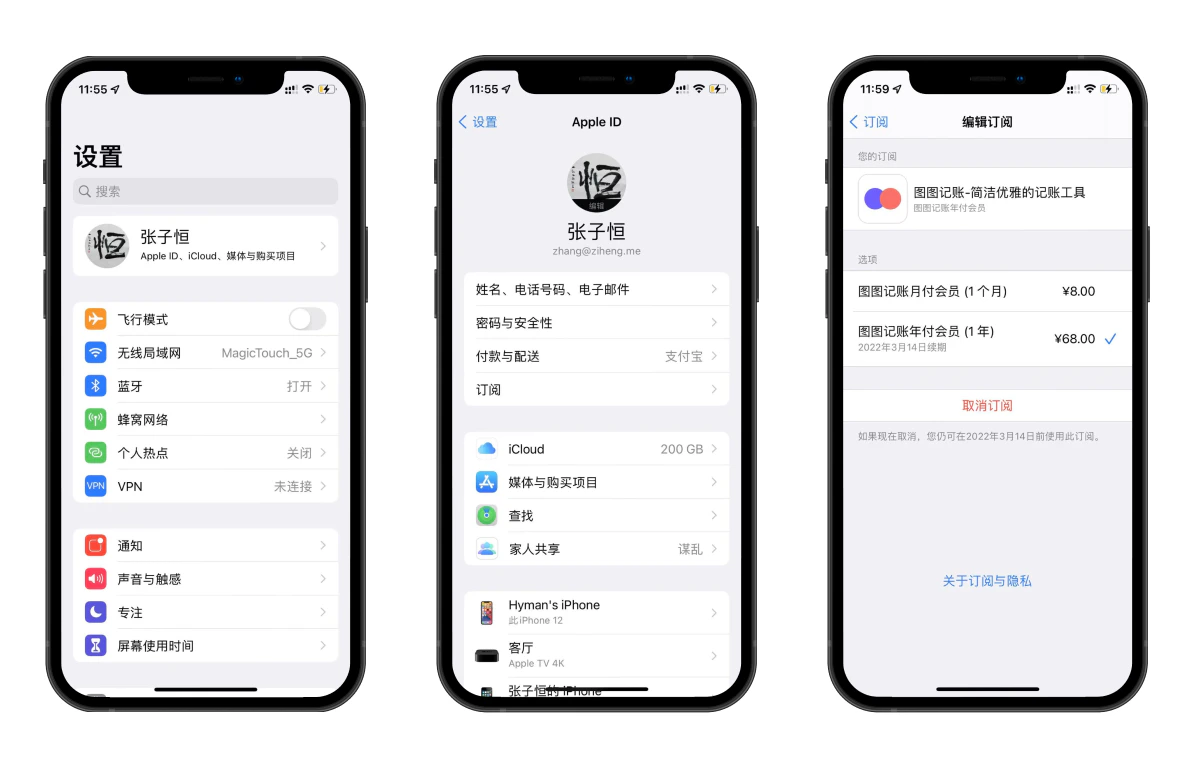 1. 在 iPhone 上打开「设置」,在页面上方点击「你的 Apple ID 账户名」;
2. 进入 Apple ID 管理页面,在列表中点击「订阅」;
3. 在订阅页中选择「图图记账」,进入编辑订阅页后点击「取消订阅」按钮。
注意!!!
取消订阅后,在你已购买的会员有效期内,你仍然可以正常使用图图记账的所有会员功能,直至有效期满;
删除 App 并不会「停止订阅续期」,到期后仍然会进行扣款,如需取消订阅,请按照上述流程操作;
已购买月费/年费,未取消订阅的情况下直接购买永久会员,月费/年费到期时仍会自动续费,需手动取消。
***
1. 在 iPhone 上打开「设置」,在页面上方点击「你的 Apple ID 账户名」;
2. 进入 Apple ID 管理页面,在列表中点击「订阅」;
3. 在订阅页中选择「图图记账」,进入编辑订阅页后点击「取消订阅」按钮。
注意!!!
取消订阅后,在你已购买的会员有效期内,你仍然可以正常使用图图记账的所有会员功能,直至有效期满;
删除 App 并不会「停止订阅续期」,到期后仍然会进行扣款,如需取消订阅,请按照上述流程操作;
已购买月费/年费,未取消订阅的情况下直接购买永久会员,月费/年费到期时仍会自动续费,需手动取消。
***